GraphQL+React로 게시판 만들기 4편 - CRUD

CRUD
지난 글에서 User와 Post 그리고 Comment Schema를 설계하고, Graphcool playground에서 생성(Create)과 조회(Read)를 해봤습니다. 이번에는 설계된 GraphQL Schema를 기반으로 직접 게시판 UI를 만들어보고 CRUD를 해보는 것까지 구현하도록 하겠습니다.
우선, 게시판 UI를 쉽게 꾸미기 위해 ant-design을 install 해줍니다.
npm install antd --save
그 후 antd를 적용해주세요.
// src/components/App.css

@import '~antd/dist/antd.css';

.App {
  text-align: center;
}
// src/components/App.js

import ListPage from './ListPage'
import NewPostLink from './NewPostLink'
import gql from 'graphql-tag'
import './App.css';

class App extends React.Component {
 // ...중략
}

인스타그램st.
위와 같이 생겼던 기존의 instagram식 UI를 한국형 게시판 UI로 고쳐보겠습니다.
import React from 'react'
import {graphql} from 'react-apollo'
import gql from 'graphql-tag'
import {Link} from 'react-router-dom'
import {Table} from 'antd';


class ListPage extends React.Component {

  render() {
    const {allPostsQuery} = this.props;
    const allPosts = allPostsQuery.allPosts;


    if (allPostsQuery && allPostsQuery.loading) {
      return (<div>Loading</div>)
    }
    return (
      <div style={{margin: '4em'}}>
        <Table
          columns={[{
            title: '제목',
            key: 'id',
            render: post => <Link to={`/post/${post.id}`}>{post.title}</Link>
          }, {
            title: '글쓴이',
            dataIndex: 'author.name',
          }, {
            title: '작성일시',
            dataIndex: 'createdAt',
            render: time => time.split("T",1),
          },
          ]}
          dataSource={allPosts}
          size="middle"
          rowKey='id'
        />
      </div>
    )
  }
}

const ALL_POSTS_QUERY = gql`
    query AllPostsQuery {
        allPosts(orderBy: createdAt_DESC) {
            id
            title
            author {
                name
            }
            comments {
                id
            }
            createdAt
        }
    }
`

export default graphql(ALL_POSTS_QUERY, {name: 'allPostsQuery'})(ListPage)
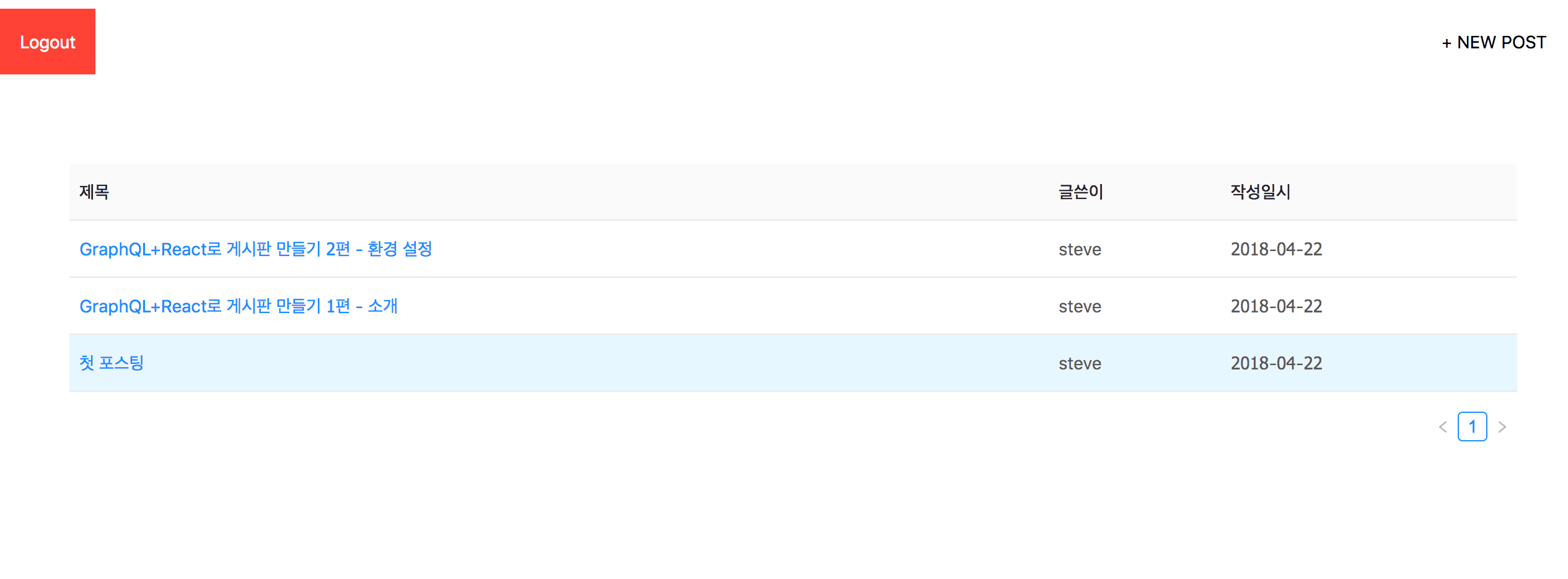
게시판 뼈대
지난 번 글에서는 graphcool playground에서 API를 통해 Post를 생성했던 것과 달리,
이번에는 직접 +NEW POST 버튼을 눌러서 브라우저에서 CRUD 중 C(Create)를 해보겠습니다.
// src/components/CreatePost.js

import React from 'react'
import { withRouter } from 'react-router-dom'
import { graphql, compose } from 'react-apollo'
import gql from 'graphql-tag'

class CreatePost extends React.Component {

  constructor(props) {
    super();

    this.state = {
      title: '',
      content: '',
      imageUrl: '',
    }
  }


  render () {
    if (this.props.loggedInUserQuery && this.props.loggedInUserQuery.loading) {
      return (<div>Loading</div>)
    }

    return (
      <div className='w-100 pa4 flex justify-center'>
        <div style={{ maxWidth: 800 }} className=''>
          <input
            className='w-100 pa3 mv2'
            value={this.state.title}
            placeholder='title'
            onChange={(e) => this.setState({title: e.target.value})}
          />
          <input
            className='w-100 pa3 mv2'
            value={this.state.content}
            placeholder='content'
            onChange={(e) => this.setState({content: e.target.value})}
          />
          <input
            className='w-100 pa3 mv2'
            value={this.state.imageUrl}
            placeholder='Image Url'
            onChange={(e) => this.setState({imageUrl: e.target.value})}
          />
          {this.state.imageUrl &&
            <img src={this.state.imageUrl} alt='' className='w-100 mv3' />
          }
          {this.state.content && this.state.imageUrl &&
            <button className='pa3 bg-black-10 bn dim ttu pointer' onClick={this.handlePost}>작성완료</button>
          }
        </div>
      </div>
    )
  }

  handlePost = async () => {
    if (!this.props.loggedInUserQuery.loggedInUser) {
      console.warn('only logged in users can create new posts')
      return
    }

    const { title, content, imageUrl } = this.state
    const authorId = this.props.loggedInUserQuery.loggedInUser.id

    await this.props.createPostMutation({variables: { title, content, imageUrl, authorId }})
    this.props.history.replace('/')
  }
}

const CREATE_POST_MUTATION = gql`
  mutation CreatePostMutation ($title: String!, $content: String!, $imageUrl: String!, $authorId: ID!) {
    createPost(title: $title, content: $content, imageUrl: $imageUrl, authorId: $authorId) {
      id
    }
  }
`

const LOGGED_IN_USER_QUERY = gql`
  query LoggedInUserQuery {
    loggedInUser {
      id
    }
  }
`

export default compose(
  graphql(CREATE_POST_MUTATION, { name: 'createPostMutation' }),
  graphql(LOGGED_IN_USER_QUERY, {
    name: 'loggedInUserQuery',
    options: { fetchPolicy: 'network-only' }
  })
)(withRouter(CreatePost))
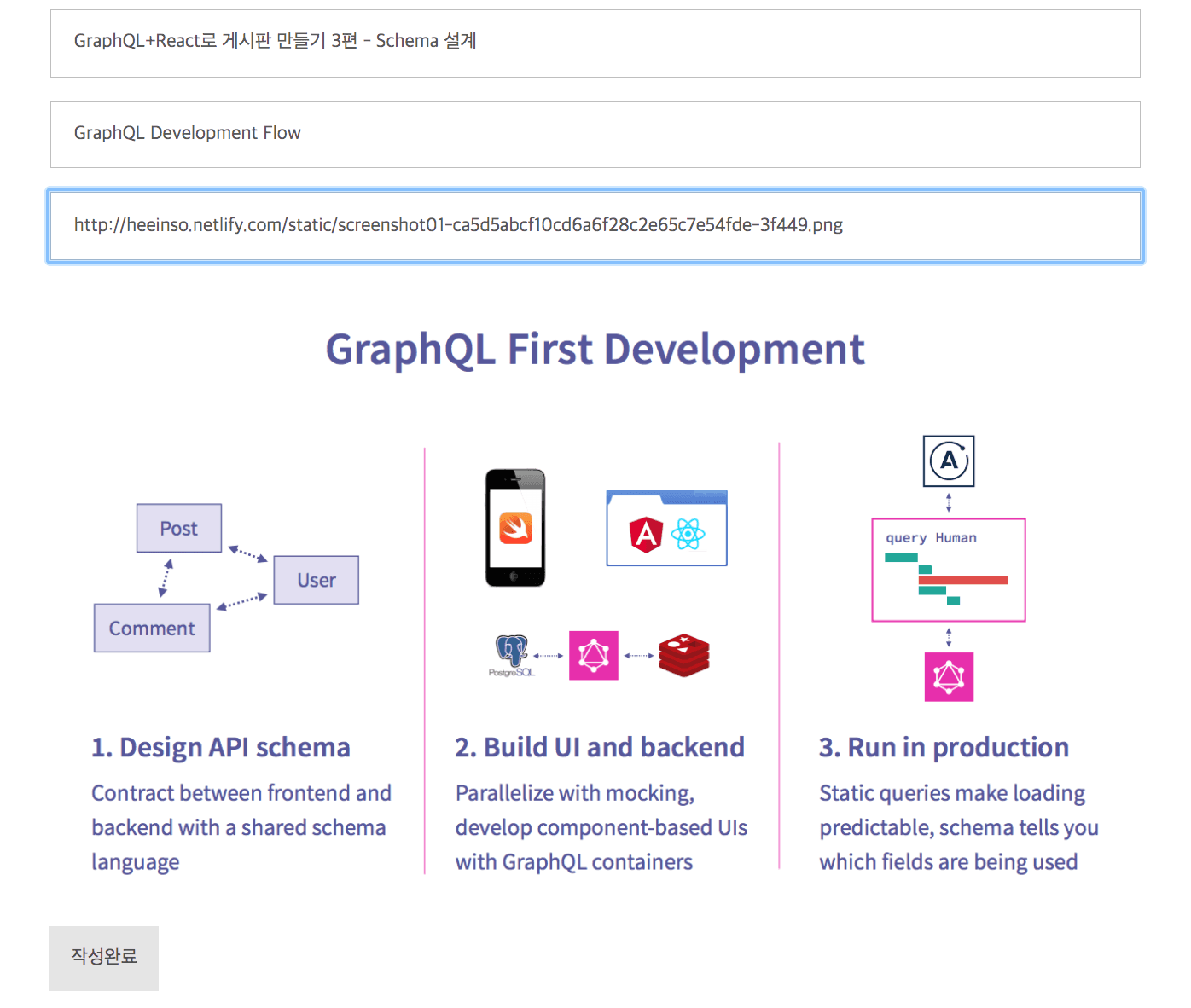
CreatePost component
이제 Create와 Read는 구현이 완료되었으니, 다음으로 Update와 Delete를 구현해봅시다!
게시물을 수정/삭제하려면 일단 게시판에서 각 게시물들을 클릭해서 상세 페이지에 들어가야합니다.
그러니 PostDetail component를 만들고 이를 게시판(ListPage)에도 적용해줍니다.
// src/components/ListPage.js

import gql from 'graphql-tag'
import {Link} from 'react-router-dom' // 추가
import {Table} from 'antd'

class ListPage extends React.Component {
  // ...
  return (
    <div style={{margin: '4em'}}>
      <Table
        columns={[{
          title: '제목',
          key: 'id',
          render: post => <Link to={`/post/${post.id}`}>{post.title}</Link>
        }, {
          title: '글쓴이',
          dataIndex: 'author.name',
        }, {
          title: '작성일시',
          dataIndex: 'createdAt',
          render: time => time.split("T", 1),
        },
        ]}
        dataSource={allPosts}
        size="middle"
        rowKey='id'
      />
    </div>
  )
  // ...
}
// src/index.js

import PostDetail from './components/PostDetail' // 추가

// ...

ReactDOM.render((
  <ApolloProvider client={client}>
    <Router>
      <div>
        <Route exact path='/' component={App} />
        <Route path='/create' component={CreatePost} />
        <Route path='/login' component={LoginUser} />
        <Route path='/signup' component={CreateUser} />
        <Route path='/post/:id' component={PostDetail} /> // 추가
      </div>
    </Router>
  </ApolloProvider>
  ),
  document.getElementById('root')
)
// src/components/PostDetail.js 생성

import React from 'react'
import {graphql, compose} from 'react-apollo'
import {Link} from 'react-router-dom'
import {withRouter} from 'react-router-dom'
import gql from 'graphql-tag'
import {Modal} from 'antd'


class PostDetail extends React.Component {

  state = {
    ModalText: '정말 삭제하시겠습니까?',
    visible: false,
    confirmLoading: false,
  };

  showModal = () => {
    this.setState({
      visible: true,
    });
  };

  handleCancel = () => {
    this.setState({
      visible: false,
    });
  };


  render() {
    if (this.props.postQuery.loading) {
      return (
        <div className='flex w-100 h-100 items-center justify-center pt7'>
          <div>
            Loading...
          </div>
        </div>
      )
    }

    const {Post} = this.props.postQuery;
    const {visible, confirmLoading, ModalText} = this.state;

    return (
      <article class="baskerville pb5" style={{marginTop: '10px'}}>
        <Link to="/" style={{margin: '10px'}}>
          <a class="f6 link dim br3 ba bw1 ph3 pv2 mb2 dib purple">
            뒤로가기
          </a>
        </Link>
        <a class="f6 link dim br3 ba bw1 ph3 pv2 mb2 dib hot-pink"
           onClick={this.showModal}
           style={{float: 'right', marginRight: '10px'}}
        >
          삭제하기
        </a>
        <Modal title="Title"
               visible={visible}
               onOk={this.handleDelete}
               confirmLoading={confirmLoading}
               onCancel={this.handleCancel}
        >
          <p>{ModalText}</p>
        </Modal>

        <header class="avenir tc-l ph3 ph4-ns pt4 pt5-ns">
          <h1 class="f3 f2-m f-subheadline-l measure lh-title fw1 mt0">{Post.title}</h1>
          <h4 class="f3 fw4 i lh-title mt0">{Post.author.name}</h4>
          <time class="f5 f4-l db fw1 baskerville mb4">{Post.createdAt.split("T", 1)}</time>
        </header>
        <div class="measure db center f5 f4-ns lh-copy">
          <img class="db w-100 mt4 mt5-ns" src={Post.imageUrl}/>
          <br/>
          <p>{Post.content}</p>
        </div>
      </article>
    )
  }

  handleDelete = async () => {
    await this.props.deletePostMutation({variables: {id: this.props.postQuery.Post.id}})
    this.setState({visible: false});
    this.props.history.replace('/')
  }
}

const DELETE_POST_MUTATION = gql`
    mutation DeletePostMutation($id: ID!) {
        deletePost(id: $id) {
            id
        }
    }
`

const POST_QUERY = gql`
    query PostQuery($id: ID!) {
        Post(id: $id) {
            id
            author {
                name
            }
            title
            content
            imageUrl
            createdAt
        }
    }
`

const DetailPageWithGraphQL = compose(
  graphql(POST_QUERY, {
    name: 'postQuery',
    options: ({match}) => ({
      variables: {
        id: match.params.id,
      },
    }),
  }),
  graphql(DELETE_POST_MUTATION, {
    name: 'deletePostMutation'
  })
)(PostDetail);


const DetailPageWithDelete = graphql(DELETE_POST_MUTATION)(DetailPageWithGraphQL);

export default withRouter(DetailPageWithDelete)
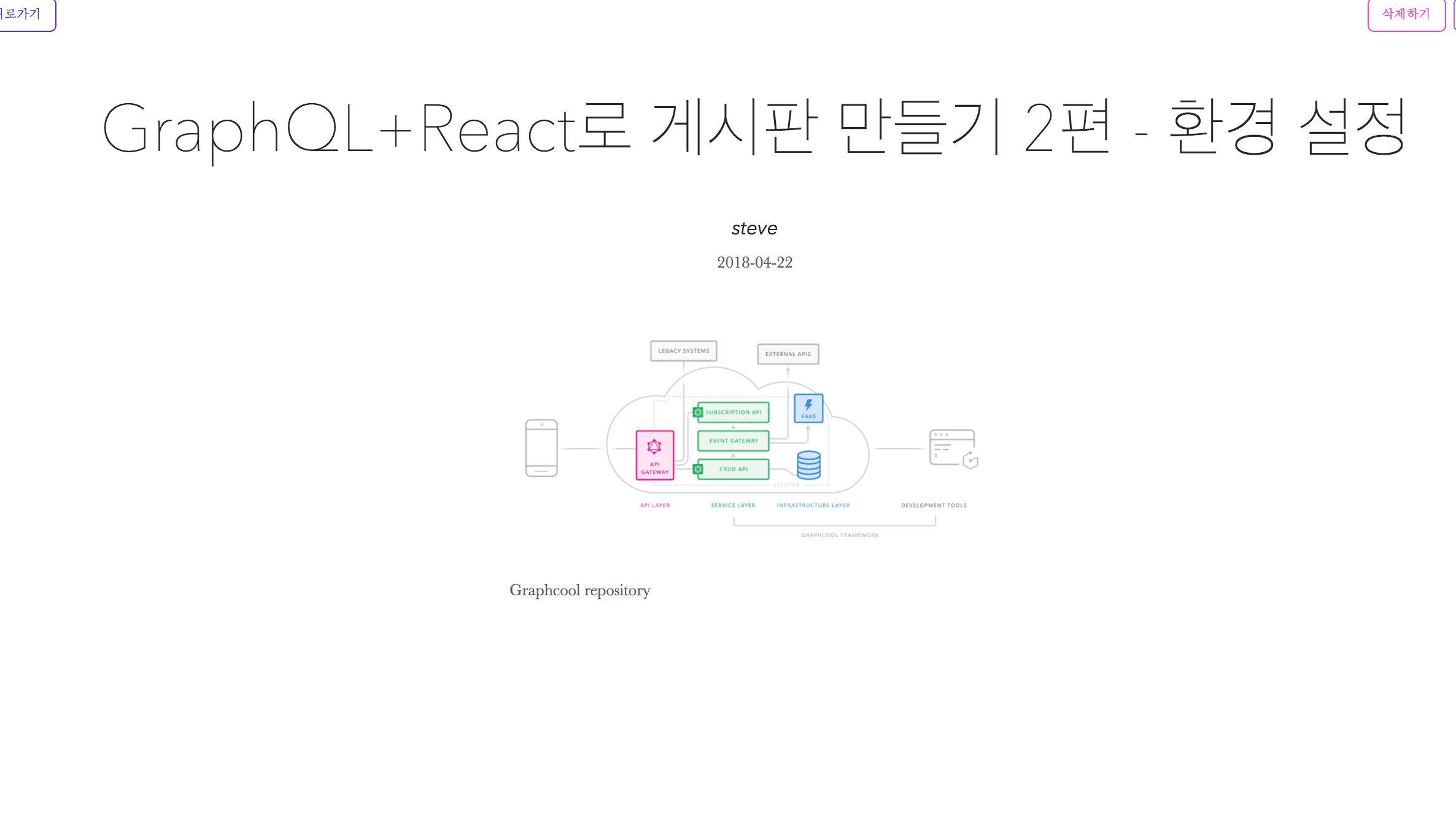
게시물 상세 페이지
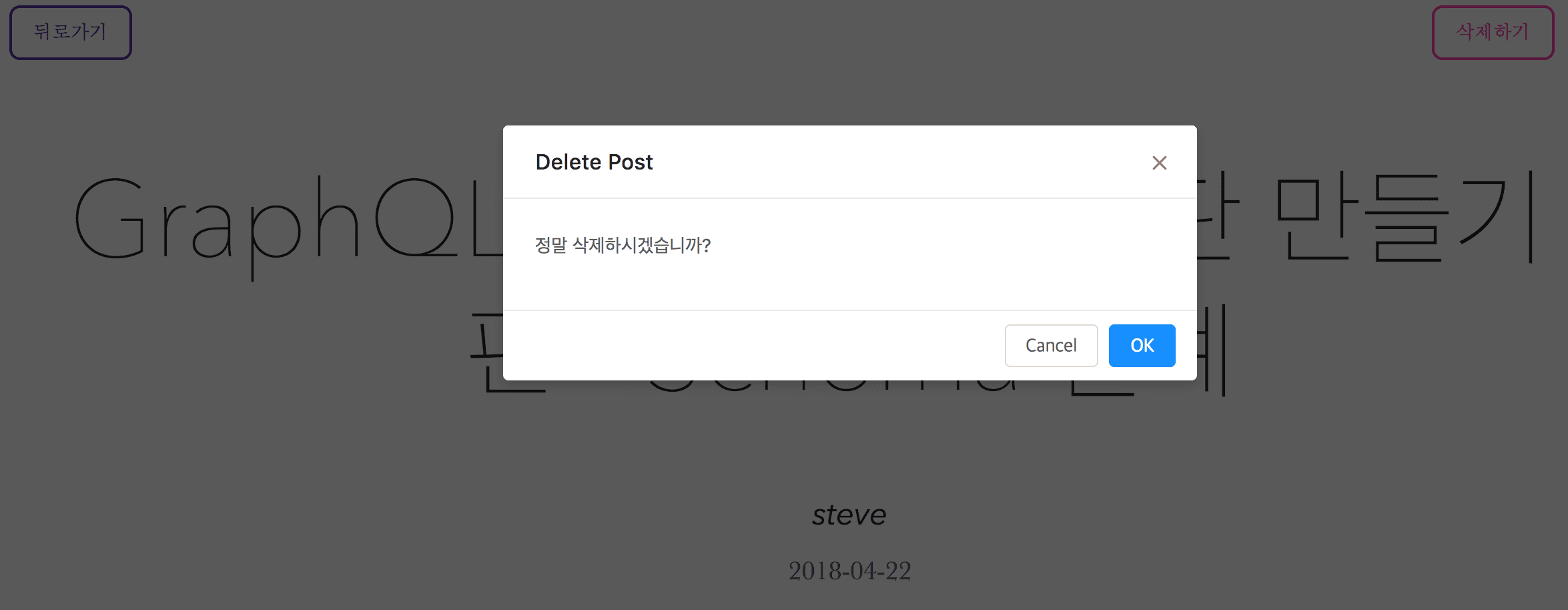
Delete Modal
게시물 삭제가 잘 되는 것을 확인할 수 있습니다! (Mutation이 일어난 후 루트 페이지로 돌아갔을 때 바로 게시물 생성/삭제가 반영이 되지 않고 새로고침을 해야 반영되는 이슈가 존재합니다. 이는 다음 편에서 Refetching Query를 설명하며 해결해 볼 것입니다.)
마지막으로 Update를 구현하기 위해 PostDetail.js 파일에 코드를 조금 더 추가해봅시다.
// src/components/PostDetail.js

import React from 'react'
import {graphql, compose} from 'react-apollo'
import {Link} from 'react-router-dom'
import {withRouter} from 'react-router-dom'
import gql from 'graphql-tag'
import {Modal} from 'antd'


class PostDetail extends React.Component {

  constructor(props) {
    super(props);

    this.state = {
      ModalText: '정말 삭제하시겠습니까?',
      visible1: false,
      visible2: false,
      confirmLoading1: false,
      confirmLoading2: false,
      ...props,
    }
  }


  showModal1 = () => {
    this.setState({
      visible1: true,
    });
  };

  showModal2 = () => {
    this.setState({
      visible2: true,
    });
  };

  handleCancel1 = () => {
    this.setState({
      visible1: false,
    });
  };

  handleCancel2 = () => {
    this.setState({
      visible2: false,
    });
  };


  render() {
    if (this.props.postQuery.loading) {
      return (
        <div className='flex w-100 h-100 items-center justify-center pt7'>
          <div>
            Loading...
          </div>
        </div>
      )
    }

    const {Post} = this.props.postQuery;
    const {visible1, visible2, confirmLoading1, confirmLoading2, ModalText} = this.state;


    return (
      <article class="baskerville pb5" style={{marginTop: '10px'}}>
        <Link to="/" style={{margin: '10px'}}>
          <a class="f6 link dim br3 ba bw1 ph3 pv2 mb2 dib purple">
            뒤로가기
          </a>
        </Link>
        <a class="f6 link dim br3 ba bw1 ph3 pv2 mb2 dib light-purple"
           onClick={this.showModal1}
           style={{float: 'right', marginRight: '10px'}}
        >
          수정하기
        </a>
        <Modal title="Update Post"
               visible={visible1}
               onOk={this.handleUpdate}
               confirmLoading={confirmLoading1}
               onCancel={this.handleCancel1}
        >
          <div className='w-100 pa4 flex justify-center'>
            <div style={{ maxWidth: 800 }} className=''>
              <input
                className='w-100 pa3 mv2'
                placeholder='title'
                defaultValue={Post.title}
                onChange={(e) => this.setState({title: e.target.value})}
              />
              <input
                className='w-100 pa3 mv2'
                placeholder='content'
                defaultValue={Post.content}
                onChange={(e) => this.setState({content: e.target.value})}
              />
              <input
                className='w-100 pa3 mv2'
                placeholder='imageUrl'
                defaultValue={Post.imageUrl}
                onChange={(e) => this.setState({imageUrl: e.target.value})}
              />
              {this.state.imageUrl &&
              <img src={this.state.imageUrl} alt='' className='w-100 mv3' />
              }
            </div>
          </div>
        </Modal>


        <a class="f6 link dim br3 ba bw1 ph3 pv2 mb2 dib hot-pink"
           onClick={this.showModal2}
           style={{float: 'right', marginRight: '10px'}}
        >
          삭제하기
        </a>
        <Modal title="Delete Post"
               visible={visible2}
               onOk={this.handleDelete}
               confirmLoading={confirmLoading2}
               onCancel={this.handleCancel2}
        >
          <p>{ModalText}</p>
        </Modal>

        <header class="avenir tc-l ph3 ph4-ns pt4 pt5-ns">
          <h1 class="f3 f2-m f-subheadline-l measure lh-title fw1 mt0">{Post.title}</h1>
          <h4 class="f3 fw4 i lh-title mt0">{Post.author.name}</h4>
          <time class="f5 f4-l db fw1 baskerville mb4">{Post.createdAt.split("T", 1)}</time>
        </header>
        <div class="measure db center f5 f4-ns lh-copy">
          <img class="db w-100 mt4 mt5-ns" src={Post.imageUrl}/>
          <br/>
          <p>{Post.content}</p>
        </div>
      </article>
    )
  }

  handleUpdate = async () => {
    await this.props.updatePostMutation({variables: {id: this.props.postQuery.Post.id, title: this.state.title || this.props.postQuery.Post.title, content: this.state.content || this.props.postQuery.Post.content, imageUrl: this.state.imageUrl || this.props.postQuery.Post.imageUrl }})
    this.setState({visible: false});
    this.props.history.replace('/')
  }

  handleDelete = async () => {
    await this.props.deletePostMutation({variables: {id: this.props.postQuery.Post.id}})
    this.setState({visible: false});
    this.props.history.replace('/')
  }
}

const UPDATE_POST_MUTATION = gql`
  mutation UpdatePostMutation($id: ID!, $title: String!, $content: String!, $imageUrl: String!) {
      updatePost(id: $id, title: $title, content: $content, imageUrl: $imageUrl) {
          id
      }
  }
`

const DELETE_POST_MUTATION = gql`
    mutation DeletePostMutation($id: ID!) {
        deletePost(id: $id) {
            id
        }
    }
`

const POST_QUERY = gql`
    query PostQuery($id: ID!) {
        Post(id: $id) {
            id
            author {
                name
            }
            title
            content
            imageUrl
            createdAt
        }
    }
`

const DetailPageWithGraphQL = compose(
  graphql(POST_QUERY, {
    name: 'postQuery',
    options: ({match}) => ({
      variables: {
        id: match.params.id,
      },
    }),
  }),
  graphql(UPDATE_POST_MUTATION, {
    name: 'updatePostMutation'
  }),
  graphql(DELETE_POST_MUTATION, {
    name: 'deletePostMutation'
  }),
)(PostDetail);


export default compose(
  graphql(UPDATE_POST_MUTATION, { name: 'updatePostMutation' }),
  graphql(DELETE_POST_MUTATION, {name: 'deletePostMutation'})
)(withRouter(DetailPageWithGraphQL))
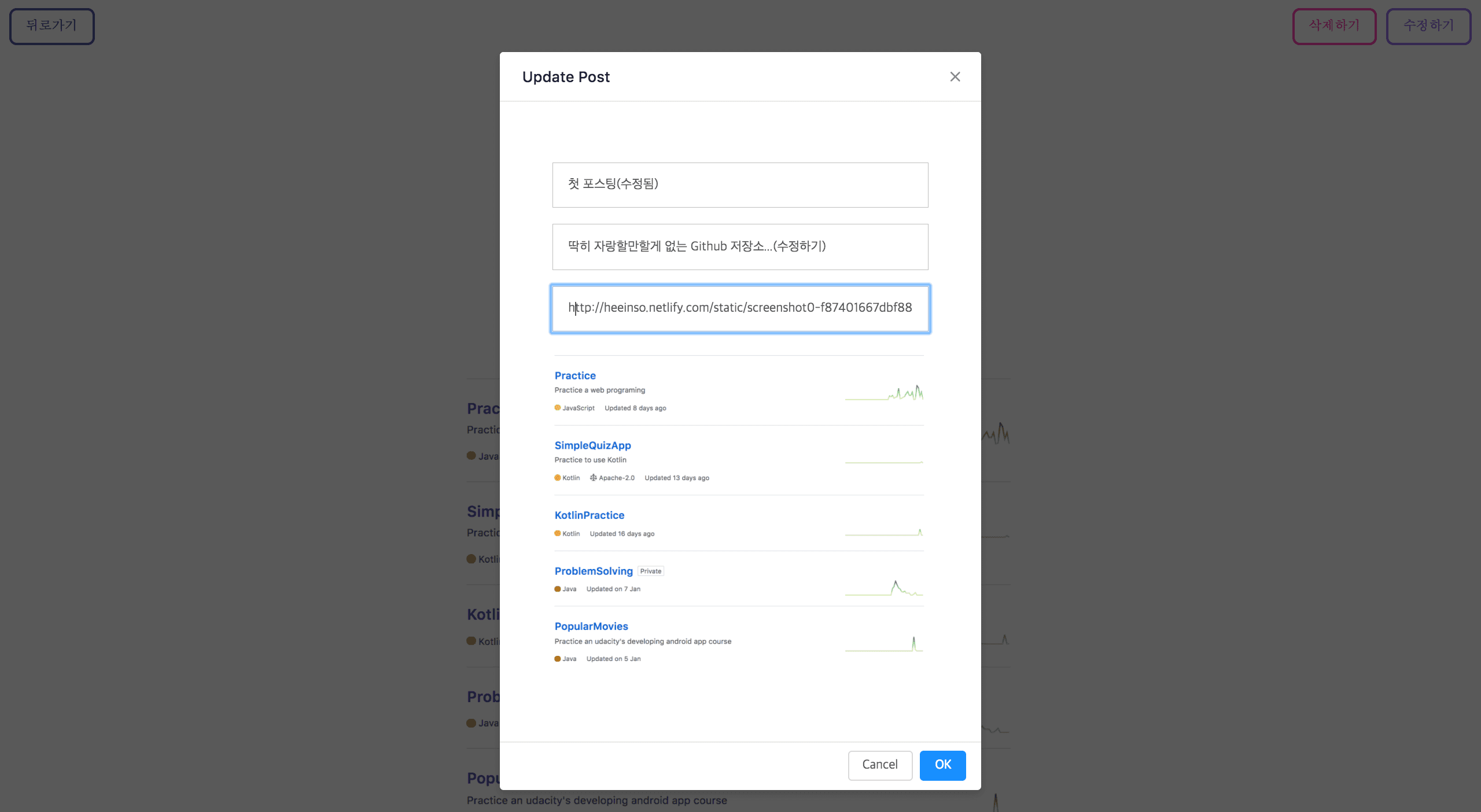
Update Modal
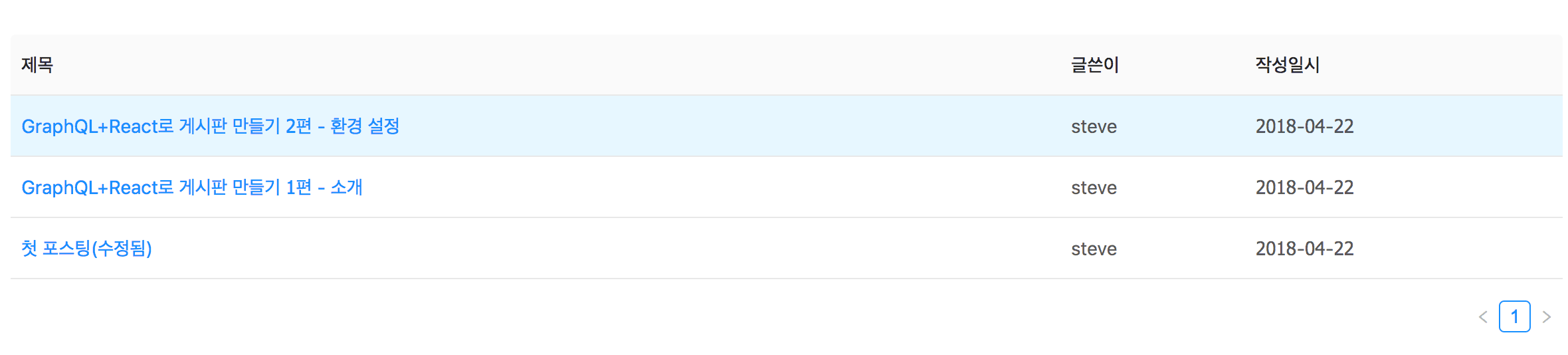
첫 포스팅이 수정됨
오늘은 GraphQL의 Mutation을 활용해 정말 간단하게 게시판의 CRUD를 구현해보았습니다. 중복된 코드도 존재하고, Mutation 이후 따로 Refetching 코드를 작성하지 않아 새로고침을 해줘야 게시물 생성/수정/삭제가 반영되며 심지어 Form validation이나 게시판 pagination 처리를 해주지도 않아 게시판이라 부르기도 민망하지만 😭 다음 편에서 리팩토링을 통해 조금은 더 완성도 있는 게시판을 만들어보도록 하겠습니다.
그동안 딱히 도움되는 꿀팁은 드리지 못했지만 GraphQL의 특징과 장점을 설명한다는 목적으로 시작된 시리즈가 어느덧 4편까지 왔습니다. 정말 간단한 게시판을 구현하는데도 포스팅에서 설명하는 코드가 수 백 줄에 이르다보니 정보 전달이 어렵기도 하고 저 스스로도 더 공부가 필요하다는 판단 하에 다음 편을 끝으로 GraphQL 시리즈를 마치고자 합니다. 그럼 다음 편에서 뵙겠습니다 ~ 👋